A single review sitting in a Google Doc is easy to manage. Twenty reviews, each at a different stage between an AI draft, a human edit, and a published page, is a different problem. Once you’re publishing on a weekly schedule, the thing that breaks first usually isn’t the writing. It’s knowing where every piece actually stands.
When people compare ClickUp vs Notion for affiliate marketing, most of that comparison happens at the level of general productivity: calendars, docs, task lists. That’s not the question here. The question is which one actually holds up as the backbone for a growing affiliate review library, where drafts move through AI assisted writing, editing, and publishing, and where at some point a VA or editor needs to step into that process without you walking them through it from scratch.
Why a project tool matters more once you’re publishing reviews every week
At low volume, you can hold the status of three or four reviews in your head. At higher volume, with reviews layered on top of affiliate link audits, seasonal content refreshes, and whatever you’re handing to a VA, that mental tracking stops working. Pieces get forgotten mid-edit. Affiliate links go unchecked for months. A draft that was supposed to be reviewed gets published as-is because nobody flagged it.
The fix isn’t more discipline. It’s a structure that shows the state of every review at a glance, without you having to ask. That’s the actual job a project tool needs to do here, and it’s worth picking the one that does it with the least friction for how you already work.
If you haven’t built the review pipeline these tools are meant to run yet, the stages and quality checkpoints are covered in How to Use AI for Affiliate Product Reviews: A Scaling Pipeline. This piece assumes that process exists and is about which tool runs it.
How ClickUp structures a review pipeline
ClickUp is built around tasks moving through statuses inside Spaces, and that maps onto a review pipeline almost directly. You’d typically set up a Space for your review library, a list for each stage, or more likely one list with a custom status field: something like Outline, AI Draft, Human Edit, Fact Check, Ready to Publish, Published, Needs Refresh.
Each review becomes a task. That task carries the product name, the target keyword, due dates, and a comment thread for back and forth with an editor. ClickUp’s automations let you trigger things off status changes: move a task to “Ready to Publish” and it can auto-assign to you for final approval, or notify a Slack channel, or set a reminder to check the affiliate link 90 days later.

The strength here is visibility at scale. A board view shows every review in the library at its current stage, color-coded, with nothing hidden in a folder somewhere. For someone running dozens of reviews with a VA or editor touching some of them, that board view alone solves a real problem.
The tradeoff is setup time. ClickUp has a lot of surface area: custom fields, multiple view types, automation rules, dependencies. Getting a review pipeline built well in ClickUp takes longer upfront than getting something similar running in Notion, and it’s easy to over-build it with fields and automations you never end up using.
How Notion structures the same job
Notion’s unit is the database, and a review library fits naturally as one. Each row is a review, with properties for status, target keyword, word count, affiliate network, and a link to the live page once published. A board view grouped by status gives you something close to ClickUp’s pipeline view, just built on a database instead of task-native statuses.

Where Notion separates itself is in how the content and the tracking sit side by side. Each review’s database entry opens into a full page, and that page can be the actual draft. The AI draft, the editor’s comments, the final version, and the tracking fields all live in one place rather than a task linking out to a document somewhere else. For a review library specifically, that’s a meaningful difference: you’re not jumping between a project board and a Google Doc, you’re working inside one object.
Notion templates also make sense here. You can build a single review template with the outline structure, a spot for the AI draft, a spot for edit notes, and the tracking properties already in place, then duplicate it for every new review so the format stays consistent without you rebuilding it each time.
The tradeoff is that Notion’s automation is lighter. You can set up basic reminders and some linked database views, but the trigger-based automations ClickUp handles natively (status change triggers a notification, a reassignment, a date calculation) usually need a third-party tool like Zapier bolted on in Notion. If you want the pipeline to nudge people automatically, Notion asks more of you to get there.
Tracking AI assisted drafts through editing without losing version control
This is where a lot of review pipelines quietly fall apart. An AI tool generates a draft, it gets pasted somewhere, an editor makes changes, and a week later nobody is sure which version is live, which paragraph was fact-checked, and whether the final edit ever actually got published.
In ClickUp, the common approach is to keep the draft in an attached doc or a linked Google Doc, and use the task’s comment thread and status changes to track what stage it’s at. That works, but the draft itself lives one click away from the task, not inside it, so you’re relying on people actually clicking through rather than everything living in one view.
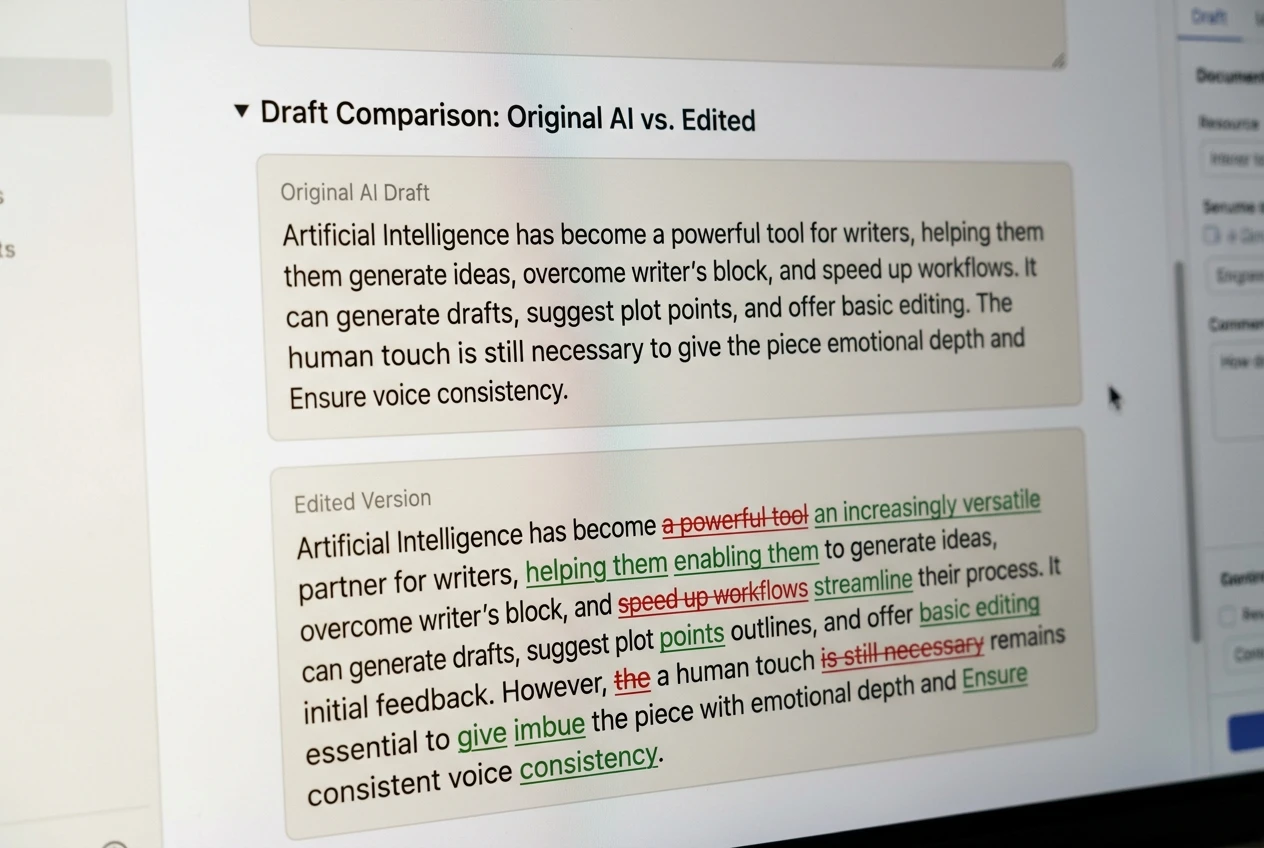
Notion handles this more naturally because the draft can live directly on the database page. You can keep the raw AI output in a toggle block, the edited version below it, and use Notion’s page history to see what changed and when. It’s not full version control in the Git sense, but for a solo operator or small team it’s usually enough to answer “what did the editor actually change” without digging through email threads.
Either way, the rule that matters more than the tool: one review should have one home. If the draft, the edit, and the publish-ready version live in three different places, the tool isn’t the problem, the process is.
Where affiliate link tracking and content audits fit
Neither tool replaces dedicated link cloaking or click tracking, and they’re not meant to. What they’re good for is scheduling and surfacing the audit itself: flagging which reviews need their affiliate links checked, which ones haven’t been touched in six months, and which ones sit in a seasonal category that needs a refresh before a buying period.
In ClickUp, this usually means a recurring task tied to each review, set to repeat every quarter, that pings whoever owns link maintenance. In Notion, it’s typically a formula field that calculates days since last updated, with a filtered view surfacing anything past a threshold.
Both approaches work. Neither does the actual link checking for you. If you haven’t set up how affiliate links are tracked and structured in the first place, that’s a separate piece of infrastructure covered in How to Track Affiliate Sales For Every Stage of Your Funnel and in the cloaking techniques piece on this site. What ClickUp or Notion adds is just the reminder system that keeps audits from being forgotten entirely.
Handing off to a VA or editor: what each tool makes easy or messy
This is often the deciding factor once a review library grows past what one person can maintain alone.

ClickUp tends to be easier to hand off to a VA for process-heavy work. The permission settings are more granular, assigning tasks is straightforward, and a VA can be given a narrow view that only shows what’s assigned to them without seeing the rest of the library. For someone managing multiple contractors across different stages, that control matters.
Notion is often easier to hand off to an editor doing deep work inside the content itself, since they’re editing directly on the page rather than toggling between a task and a linked doc. But Notion’s permission structure is coarser. Giving someone edit access to a page usually means they can see more of the surrounding workspace than you’d get with ClickUp’s tighter task-level permissions, which matters if your workspace holds anything beyond the review library.
Neither tool magically makes outsourcing smooth on its own. The actual handoff still depends on clear instructions and a consistent template, which is a people problem more than a software one. The tool just determines how much friction sits around that handoff.
Pricing at solo scale versus pricing once you add a helper
Both tools offer a usable free tier for one person running a review pipeline solo. ClickUp’s free plan covers a reasonable number of tasks and basic automations; Notion’s free plan is generous for a single-user database setup. At solo scale, either one can run your review pipeline without a paid plan.

The cost difference shows up once you add a second person. Both tools charge per seat on their paid tiers, so the moment you bring on a VA or editor, you’re paying for their seat in addition to your own. ClickUp’s automations and more advanced views tend to live behind paid tiers sooner than Notion’s equivalent features, so if you want the automation-heavy pipeline described above, you’ll likely hit a paid plan faster in ClickUp than in Notion.
Check current pricing on each provider’s site before committing, since both tools adjust tiers and seat costs periodically. What’s stable is the pattern: cheap or free at solo scale, a real line-item cost once collaborators join.
Which one actually fits where your review library is right now
If you’re solo, publishing consistently, and want the draft and the tracking living in the same place without much setup overhead, Notion fits that stage well. The database-as-document structure matches the way a review pipeline naturally works for one person doing the writing, editing, and publishing themselves.
If you’re already working with a VA or editor, or about to bring one on, and you need task-level permissions, automated status handoffs, and a board that shows the whole library’s pipeline without digging into individual pages, ClickUp earns its heavier setup cost at that point.
Neither tool fixes a pipeline that doesn’t exist yet. If you haven’t built the review pipeline these tools are meant to run, read How to Use AI to Scale Affiliate Product Reviews Without Losing Quality first, then come back and pick the tool that fits that process.